Infrastructure-as-Code: Scaling Mainframe Workloads on AWS with Terraform
Modernize mainframe workloads with Terraform and Kubernetes on AWS EKS. Todd Bernson, CTO, provides a step-by-step guide to automating infrastructure deployment, provisioning persistent storage with EFS, and scaling COBOL-based batch processing in a cloud-native environment.

Todd Bernson
2025-02-12

Mainframe workloads are costly, rigid, and difficult to scale. As enterprises look for modernization strategies, IaC with Terraform provides a seamless way to transition these legacy systems into scalable Kubernetes (EKS) environments. This blog explores how enterprises can leverage Terraform to provision, manage, and scale cloud-based infrastructure that supports modernized COBOL workloads while reducing operational complexity.
The Need for Modernization
Many organizations rely on COBOL-based batch processing that runs on mainframes. These systems are:
- Expensive: High licensing and maintenance costs.
- Inflexible: Limited scalability for growing workloads.
- Resource-Intensive: Requires specialized skills that are increasingly rare.
Solution: Automating AWS Infrastructure with Terraform
By defining cloud resources as code, Terraform enables organizations to:
Deploy and manage AWS EKS clusters efficiently.
Automate provisioning of EFS storage for legacy data.
Implement IAM roles with least-privilege policies for security.
Maintain version-controlled infrastructure using GitOps.
Infrastructure Overview
This solution deploys an AWS-backed Kubernetes environment where COBOL-based data processing runs as a scheduled Kubernetes CronJob. The following diagram illustrates the architecture:
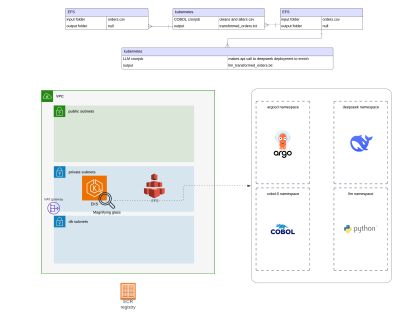
- EKS Cluster: Hosts containerized COBOL applications.
- EFS Storage: Stores processed CSV data.
- IAM Roles & Policies: Provides secure access control.
- Terraform Automation: Manages cloud resources as code.
Step-by-Step Implementation with Terraform
1. Deploying an AWS EKS Cluster
The following Terraform script provisions an Amazon EKS cluster with worker nodes.
module "eks" {
  source  = "terraform-aws-modules/eks/aws"
  version = "20.31.6"

  cluster_name = local.environment

  authentication_mode             = "API_AND_CONFIG_MAP"
  cluster_version                 = var.eks_cluster_version
  cluster_endpoint_private_access = true
  cluster_endpoint_public_access  = true

  cluster_ip_family = "ipv4"

  cluster_addons = {
    aws-ebs-csi-driver = {
      service_account_role_arn = module.ebs_csi_irsa_role.iam_role_arn
      most_recent              = true
    }
    aws-efs-csi-driver = {
      service_account_role_arn = module.efs_csi_irsa_role.iam_role_arn
      most_recent              = true
    }
    coredns = {
      most_recent = true
    }
    kube-proxy = {
      most_recent = true
    }
    vpc-cni = {
      most_recent    = true
      before_compute = true
      configuration_values = jsonencode({
        env = {
          ENABLE_PREFIX_DELEGATION = "true"
          WARM_PREFIX_TARGET       = "1"
        }
      })
    }
  }

  iam_role_additional_policies = {
    AmazonEC2ContainerRegistryReadOnly = "arn:aws:iam::aws:policy/AmazonEC2ContainerRegistryReadOnly"
  }

  enable_cluster_creator_admin_permissions = true

  cluster_tags = var.tags

  vpc_id     = module.vpc.vpc_id
  subnet_ids = module.vpc.private_subnets

  eks_managed_node_groups = {
    gpu_node_group = {
      ami_type       = "AL2_x86_64_GPU"
      instance_types = [var.eks_node_gpu_instance_type]

      min_size     = 1
      max_size     = 3
      desired_size = 1

      use_latest_ami_release_version = true

      ebs_optimized     = true
      enable_monitoring = true

      block_device_mappings = {
        xvda = {
          device_name = "/dev/xvda"
          ebs = {
            volume_size           = 75
            volume_type           = "gp3"
            encrypted             = true
            delete_on_termination = true
          }
        }
      }

      labels = {
        gpu                      = true
        "nvidia.com/gpu.present" = true
      }

      pre_bootstrap_user_data = <<-EOT
        #!/bin/bash
        set -ex

        # Install dependencies
        yum install -y cuda

        # Add the NVIDIA package repositories
        distribution=$(. /etc/os-release;echo $ID$VERSION_ID)
        curl -s -L https://nvidia.github.io/nvidia-docker/$distribution/nvidia-docker.repo | sudo tee /etc/yum.repos.d/nvidia-docker.repo

        # Install the NVIDIA container runtime
        sudo yum install -y nvidia-container-toolkit
      EOT
    }

    node_group = {
      ami_type       = "AL2_x86_64"
      instance_types = [var.eks_node_instance_type]

      min_size     = 1
      max_size     = 5
      desired_size = 1

      use_latest_ami_release_version = true

      ebs_optimized     = true
      enable_monitoring = true

      block_device_mappings = {
        xvda = {
          device_name = "/dev/xvda"
          ebs = {
            volume_size           = 75
            volume_type           = "gp3"
            encrypted             = true
            delete_on_termination = true
          }
        }
      }

      labels = {
        gpu = false
      }

      iam_role_additional_policies = {
        AmazonSSMManagedInstanceCore = data.aws_iam_policy.AmazonSSMManagedInstanceCore.arn
        eks_efs                      = aws_iam_policy.eks_efs.arn
      }

      tags = var.tags
    }
  }
}
2. Setting Up EFS for Persistent Data Storage
Legacy workloads often require shared storage for processing large CSV files. AWS EFS provides scalable, persistent storage.
module "efs" {
  source  = "terraform-aws-modules/efs/aws"
  version = "1.6.5"

  name           = var.environment
  creation_token = var.environment
  encrypted      = true

  mount_targets              = { for k, v in zipmap(local.availability_zones, module.vpc.private_subnets) : k => { subnet_id = v } }
  security_group_description = "${var.environment} EFS security group"
  security_group_vpc_id      = module.vpc.vpc_id
  security_group_rules = {
    vpc = {
      description = "Ingress from VPC private subnets"
      cidr_blocks = module.vpc.private_subnets_cidr_blocks
    }
  }

  tags = var.tags
}
Terraform Workflow for AWS Infrastructure
- Define Infrastructure in Terraform (
.tffiles). - Initialize Terraform to download AWS provider plugins.
- Plan Deployment to preview changes.
- Apply Changes to provision AWS resources.
- Monitor & Manage infrastructure via Terraform state files.
.
├── backend.tf
├── ecr.tf
├── efs.tf
├── eks.tf
├── k8s.tf
├── local.tf
├── outputs.tf
├── plan.out
├── terraform.tfvars
├── variables.tf
├── versions.tf
└── vpc.tf
Deploying the Infrastructure
1. Initialize Terraform
terraform init
2. Plan Infrastructure Deployment
terraform plan -out=infra_plan.out
3. Apply Changes to Provision AWS Resources
terraform apply infra_plan.out
Once applied, Terraform provisions:
- An EKS Cluster.
- EFS Storage for data persistence.
- IAM roles and policies for security.
Scaling & Automation Benefits
Using Terraform for AWS infrastructure automation provides several advantages:
Scalability: Easily scale Kubernetes workloads across multiple nodes.
Cost Savings: Optimized resource provisioning reduces cloud costs.
Security: Enforced IAM policies and secure storage solutions.
Agility: Version-controlled infrastructure allows easy rollbacks and updates.
Final Thoughts
By leveraging Terraform to automate the deployment of AWS-based Kubernetes environments, enterprises can modernize mainframe workloads, reduce costs, and enhance scalability—all while maintaining security and operational control.
Read More
View all posts
AI/ML
Why Enterprise AI Must Be Application-Led, Not Agent-Led
A deep dive by Todd Bernson, CTO and Chief AI Officer, on why enterprise AI systems should be architected as application-led, deterministic platforms with embedded agentic AI—not fully autonomous agents. This article explains how API-first, governed, multi-channel architectures deliver higher reliability, compliance, scalability, and business value in real-world Fortune-500 environments.
Todd Bernson
2025-12-02

AI/ML
Application-First Agentic AI
Application-first agentic AI is emerging as the only reliable path to real enterprise ROI. In this in-depth analysis, Todd Bernson, CTO & CAIO, breaks down why most generative AI initiatives stall in production—and how disciplined enterprise architecture, deterministic workflows, and narrowly scoped AI agents can finally unlock repeatable business value. Using a real sprint-intelligence system as a case study, the article shows how organizations can combine serverless engineering, structured orchestration, and constrained LLM reasoning to reduce reporting effort, increase trust, eliminate hallucinations, and deliver actionable insights across engineering, operations, compliance, and customer experience.
Todd Bernson
2025-11-28

AI/ML
Why 95% of AI Projects Fail and How to Be Among the 5% That Succeed

Lee Hylton
2025-08-22