End-to-End Deployment of Azure Serverless Web App Using Terraform
Todd Bernson, CTO, details the end-to-end deployment of a serverless web app on Azure using Terraform. This guide covers configuring Azure CDN for static content, an Azure Function App for dynamic requests, and AWS Route 53 for a custom domain with HTTPS, ensuring a scalable, secure setup for serverless web applications.

Todd Bernson
2024-11-08

Deploying a serverless web app with Azure requires a seamless integration of static and dynamic components. Using Terraform, we can automate the deployment of both static content served by Azure CDN and dynamic functionality handled by Azure Function App. This article covers the complete deployment process, from configuring providers and variables to deploying infrastructure and validating outputs. By the end, you'll have a fully deployed serverless web app, accessible via a custom domain with HTTPS.
Step 1: Setting Up Providers and Variables
To get started, we need to define our providers and variables in Terraform. This includes setting up Azure and AWS providers (for Route 53), as well as defining variables for configurable elements like resource names and locations.
Terraform Code - Providers and Variables
locals {
  project = replace(var.project, "_", "-")
}

variable "cdn_profile_sku" {
  description = "App function tier"
  type        = string

  default = null
}

variable "function_app_os_type" {
  description = "App function OS type"
  type        = string

  default = null
}

variable "function_app_sku" {
  description = "App function SKU"
  type        = string

  default = null
}

variable "project" {
  description = "Project name"
  type        = string

  default = null
}

variable "public_domain" {
  description = "Public domain name"
  type        = string

  default = null
}

variable "tags" {
  description = "Tags to apply to the resource"
  type        = map(string)

  default = {}
}

variable "vnet_cidr" {
  description = "vnet CIDR"
  type        = string

  default = null
}

provider "azurerm" {
  features {}

  subscription_id = <SUBSCRIPTION_ID>
}
This configuration includes:
- Providers for Azure.
- Variables for project names, location, CDN profile SKU, custom domain, and Function App OS type.
Step 2: Defining the Azure Storage Account and CDN for Static Content
The next step is setting up a storage account for static files and configuring Azure CDN to serve this content.
Terraform Code - Storage Account and CDN Configuration
locals {
  mime_types = {
    "css"  = "text/css"
    "html" = "text/html"
    "ico"  = "image/ico"
    "jpg"  = "image/jpeg"
    "js"   = "application/javascript"
    "json" = "application/json"
    "map"  = "application/octet-stream"
    "png"  = "image/png"
    "svg"  = "image/svg+xml"
    "txt"  = "text/plain"
  }

  site_files_dir = "${path.module}/site_files"

  site_files_index_template_dir = "${path.module}/site_files_index_template"

  storage_sitefiles_path = "www"
}

resource "azurerm_storage_account" "this" {
  name = replace(var.project, "_", "")

  resource_group_name = azurerm_resource_group.this.name
  location            = azurerm_resource_group.this.location

  account_tier             = "Standard"
  account_replication_type = "LRS"
}

resource "azurerm_storage_blob" "index_html" {
  name                   = "index.html"
  storage_account_name   = azurerm_storage_account.this.name
  storage_container_name = azurerm_storage_container.sitefiles.name
  type                   = "Block"
  content_type           = "text/html"

  source_content = templatefile("${local.site_files_index_template_dir}/index.html.tmpl", {
    function_app_url = azurerm_linux_function_app.this.default_hostname
    function_name    = azurerm_linux_function_app.this.name
  })
}

resource "azurerm_storage_blob" "site_files" {
  for_each = fileset(local.site_files_dir, "**/*")

  name = each.value

  content_type           = lookup(local.mime_types, split(".", each.value)[length(split(".", each.value)) - 1])
  source                 = "${local.site_files_dir}/${each.value}"
  storage_account_name   = azurerm_storage_account.this.name
  storage_container_name = azurerm_storage_container.sitefiles.name
  type                   = "Block"
}

resource "azurerm_storage_container" "function_code" {
  name                  = local.function_code_directory
  storage_account_name  = azurerm_storage_account.this.name
  container_access_type = "private"
}

resource "azurerm_storage_container" "sitefiles" {
  name                  = local.storage_sitefiles_path
  storage_account_name  = azurerm_storage_account.this.name
  container_access_type = "blob"
}

resource "azurerm_cdn_profile" "this" {
  name = local.project

  location            = azurerm_resource_group.this.location
  resource_group_name = azurerm_resource_group.this.name

  sku = var.cdn_profile_sku
}

resource "azurerm_cdn_endpoint" "this" {
  name = local.project

  location            = azurerm_resource_group.this.location
  resource_group_name = azurerm_resource_group.this.name

  optimization_type  = "GeneralWebDelivery"
  origin_host_header = azurerm_storage_account.this.primary_blob_host
  origin_path        = "/${local.storage_sitefiles_path}"
  profile_name       = azurerm_cdn_profile.this.name

  origin {
    name       = local.project
    host_name  = azurerm_storage_account.this.primary_blob_host
    http_port  = 80
    https_port = 443
  }

  is_compression_enabled    = true
  content_types_to_compress = ["text/html", "text/css", "application/javascript"]

  is_http_allowed  = false
  is_https_allowed = true
}

resource "azurerm_cdn_endpoint_custom_domain" "this" {
  name            = replace(local.site_domain, ".", "-")
  cdn_endpoint_id = azurerm_cdn_endpoint.this.id
  host_name       = local.site_domain

  cdn_managed_https {
    certificate_type = "Dedicated"
    protocol_type    = "ServerNameIndication"
    tls_version      = "TLS12"
  }
}
Step 3: Setting Up the Function App for Dynamic Content
For dynamic content, we deploy an Azure Function App that serves as the backend API, handling HTTP requests. This function is stored in a storage container and runs in a Linux environment.
Terraform Code - Function App Configuration
data "archive_file" "function_code" {
  type = "zip"

  output_path = "${path.module}/${local.function_code_directory}/${local.function_zip_file}"
  source_dir  = "${path.module}/${local.function_code_directory}/"

  excludes = ["*.zip"]
}

locals {
  app_function_os_type = title(var.function_app_os_type)

  function_code_directory = "function-code"

  function_zip_file = "function_code.zip"
}

resource "azurerm_linux_function_app" "this" {
  name                = "${local.project}-functions"
  resource_group_name = azurerm_resource_group.this.name
  location            = azurerm_resource_group.this.location

  storage_account_name       = azurerm_storage_account.this.name
  storage_account_access_key = azurerm_storage_account.this.primary_access_key
  service_plan_id            = azurerm_service_plan.this.id

  identity {
    type = "SystemAssigned"
  }

  site_config {
    application_stack {
      node_version = "20"
    }

    cors {
      allowed_origins = [
        "https://${local.site_domain}"
      ]
    }
  }

  app_settings = {
    "WEBSITE_RUN_FROM_PACKAGE" = "${azurerm_storage_account.this.primary_blob_endpoint}${local.function_code_directory}/${local.function_zip_file}"
  }
}

resource "azurerm_role_assignment" "function_storage_access" {
  scope                = azurerm_storage_account.this.id
  role_definition_name = "Storage Blob Data Reader"
  principal_id         = azurerm_linux_function_app.this.identity[0].principal_id
}

resource "azurerm_service_plan" "this" {
  name = "${local.project}-service-plan"

  location            = azurerm_resource_group.this.location
  resource_group_name = azurerm_resource_group.this.name

  os_type  = local.app_function_os_type
  sku_name = "B1"
}

resource "azurerm_storage_blob" "function_code" {
  name = local.function_zip_file

  content_md5            = data.archive_file.function_code.output_md5
  source                 = data.archive_file.function_code.output_path
  storage_account_name   = azurerm_storage_account.this.name
  storage_container_name = azurerm_storage_container.function_code.name
  type                   = "Block"
}
Step 4: Setting Up Route 53 for Custom Domain
We use AWS Route 53 to configure a custom domain for our CDN endpoint, providing an accessible and branded URL for users.
Terraform Code - Route 53 Configuration
data "aws_route53_zone" "this" {
  name = var.public_domain

  private_zone = false
}

locals {
  site_domain = "${local.project}.${var.public_domain}"
}

resource "aws_route53_record" "site" {
  zone_id = data.aws_route53_zone.this.zone_id
  name    = local.site_domain
  type    = "CNAME"
  ttl     = 60

  set_identifier = local.project
  records        = [azurerm_cdn_endpoint.this.fqdn]

  weighted_routing_policy {
    weight = 100
  }
}
Step 5: Outputs for Deployment Validation
To make it easy to access important URLs and other output data, we configure outputs to display after the deployment is complete.
Terraform Code - Outputs
output "cdn_endpoint_url" {
  value = azurerm_cdn_endpoint_custom_domain.this.host_name
}
Step 6: Running the Terraform Deployment
With all components defined, we can now execute the deployment process using Terraform commands.
Initialize Terraform to download necessary providers and set up the environment.
terraform initPlan the Deployment to review what changes will be applied.
terraform plan -out=plan.outApply the Configuration to create the resources.
terraform apply plan.out
Screenshot Placeholder: Terminal view showing Terraform commands (init, plan, apply) and output.
Step 7: Verifying the Deployment
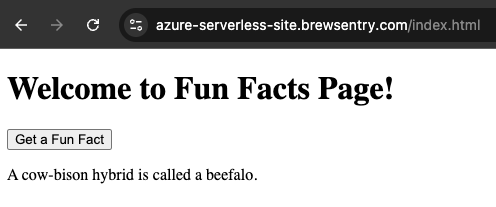
After the deployment completes, check the outputs in the terminal. The cdn_endpoint_url, function_app_url, and custom_domain will display, allowing you to verify that both static and dynamic parts are accessible.
To further verify, open the custom_domain URL in a browser. You should see your static content served via CDN with HTTPS enabled, and the backend functionality accessible via the function app URL.
Screenshot Placeholder: Output showing successful deployment with CDN endpoint and custom domain URL.
By leveraging Terraform for an end-to-end deployment, we’ve automated the provisioning of a complete serverless web application on Azure, with a custom domain managed through Route 53. This setup includes both static and dynamic components, allowing for scalable, secure, and easily repeatable deployments.
In upcoming articles, we’ll explore performance optimization, security best practices, and maintenance strategies for Azure serverless applications. Stay tuned!
Read More
View all posts
AI/ML
Why Enterprise AI Must Be Application-Led, Not Agent-Led
A deep dive by Todd Bernson, CTO and Chief AI Officer, on why enterprise AI systems should be architected as application-led, deterministic platforms with embedded agentic AI—not fully autonomous agents. This article explains how API-first, governed, multi-channel architectures deliver higher reliability, compliance, scalability, and business value in real-world Fortune-500 environments.
Todd Bernson
2025-12-02

AI/ML
Application-First Agentic AI
Application-first agentic AI is emerging as the only reliable path to real enterprise ROI. In this in-depth analysis, Todd Bernson, CTO & CAIO, breaks down why most generative AI initiatives stall in production—and how disciplined enterprise architecture, deterministic workflows, and narrowly scoped AI agents can finally unlock repeatable business value. Using a real sprint-intelligence system as a case study, the article shows how organizations can combine serverless engineering, structured orchestration, and constrained LLM reasoning to reduce reporting effort, increase trust, eliminate hallucinations, and deliver actionable insights across engineering, operations, compliance, and customer experience.
Todd Bernson
2025-11-28

AI/ML
Why 95% of AI Projects Fail and How to Be Among the 5% That Succeed

Lee Hylton
2025-08-22