Deploying Static Content via Azure CDN with Storage Account Integration
This guide provides a comprehensive walkthrough of deploying a serverless web app on Azure for static asset delivery using Azure CDN and Storage Account, integrated seamlessly with Route 53 for a custom domain. Todd Bernson, CTO, showcases how to leverage Terraform to automate this setup, with considerations for HTTPS, CORS configuration, and performance optimization.

Todd Bernson
2024-10-29

Deploying static assets like HTML, CSS, and JavaScript files is a core part of serverless architecture, and Azure provides a powerful solution with its CDN and Storage Account services. This post will guide you through deploying these assets via Azure CDN, integrating CORS, and setting up a custom domain using Route 53. I'll use Terraform to manage the entire setup, making it repeatable and scalable.
Step 1: Setting Up Azure CDN and Storage Account with Terraform
My architecture involves storing static files in an Azure Storage Account and delivering them to end-users via Azure CDN. This combination reduces latency, leverages HTTPS for secure content delivery, and is optimized for performance.
Terraform Code - CDN and Storage Account Configuration
The following Terraform code provisions an Azure CDN profile and endpoint, a storage account, and storage containers for my static files. It also sets up a custom domain with HTTPS.
resource "azurerm_cdn_profile" "this" {
  name                = local.project
  location            = azurerm_resource_group.this.location
  resource_group_name = azurerm_resource_group.this.name
  sku                 = var.cdn_profile_sku
}

resource "azurerm_cdn_endpoint" "this" {
  name                = local.project
  location            = azurerm_resource_group.this.location
  resource_group_name = azurerm_resource_group.this.name
  optimization_type   = "GeneralWebDelivery"
  origin_host_header  = azurerm_storage_account.this.primary_blob_host
  origin_path         = "/${local.storage_sitefiles_path}"
  profile_name        = azurerm_cdn_profile.this.name

  origin {
    name       = local.project
    host_name  = azurerm_storage_account.this.primary_blob_host
    http_port  = 80
    https_port = 443
  }

  is_compression_enabled    = true
  content_types_to_compress = ["text/html", "text/css", "application/javascript"]

  is_http_allowed  = false
  is_https_allowed = true
}

resource "azurerm_cdn_endpoint_custom_domain" "this" {
  name            = replace(local.site_domain, ".", "-")
  cdn_endpoint_id = azurerm_cdn_endpoint.this.id
  host_name       = local.site_domain

  cdn_managed_https {
    certificate_type = "Dedicated"
    protocol_type    = "ServerNameIndication"
    tls_version      = "TLS12"
  }
}
Step 2: Uploading Static Content to Azure Storage Account
I need a storage account to host my static files, with blobs for each file type. This code sets up the storage account, containers, and blob uploads for assets like HTML, CSS, JavaScript, and images.
Terraform Code - Storage Account and Blob Configuration
resource "azurerm_storage_account" "this" {
  name                     = replace(var.project, "_", "")
  resource_group_name      = azurerm_resource_group.this.name
  location                 = azurerm_resource_group.this.location
  account_tier             = "Standard"
  account_replication_type = "LRS"
}

resource "azurerm_storage_blob" "index_html" {
  name                   = "index.html"
  storage_account_name   = azurerm_storage_account.this.name
  storage_container_name = azurerm_storage_container.sitefiles.name
  type                   = "Block"
  content_type           = "text/html"

  source_content = templatefile("${local.site_files_index_template_dir}/index.html.tmpl", {
    function_app_url = azurerm_linux_function_app.this.default_hostname
    function_name    = azurerm_linux_function_app.this.name
  })
}

resource "azurerm_storage_blob" "site_files" {
  for_each = fileset(local.site_files_dir, "**/*")
  name     = each.value

  content_type           = lookup(local.mime_types, split(".", each.value)[length(split(".", each.value)) - 1])
  source                 = "${local.site_files_dir}/${each.value}"
  storage_account_name   = azurerm_storage_account.this.name
  storage_container_name = azurerm_storage_container.sitefiles.name
  type                   = "Block"
}

resource "azurerm_storage_container" "sitefiles" {
  name                  = local.storage_sitefiles_path
  storage_account_name  = azurerm_storage_account.this.name
  container_access_type = "blob"
}
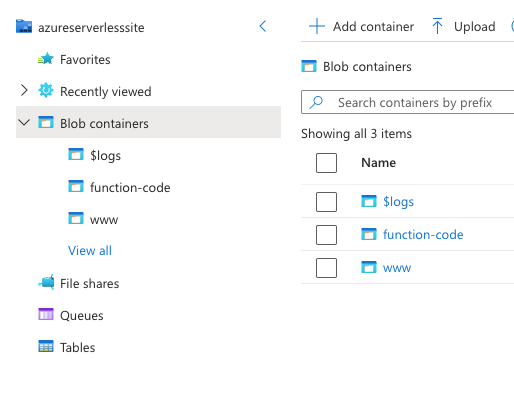
Step 3: Setting Up CORS for the Storage Account
Cross-Origin Resource Sharing (CORS) allows the CDN to access the storage account securely, preventing unauthorized sites from making requests. This Terraform code sets up CORS for my storage account.
Terraform Code - CORS Setup
resource "azurerm_storage_account_cors_rule" "this" {
  storage_account_name = azurerm_storage_account.this.name

  cors_rule {
    allowed_origins = ["*"]
    allowed_methods = ["GET"]
    max_age_in_seconds = 3600
    allowed_headers = ["*"]
    exposed_headers = ["*"]
  }
}
index.html.tmpl for Static Content
Below is a Terraform template file for the HTML page that interacts with an Azure Function App. This file would be uploaded to the storage account and served via the CDN.
<!DOCTYPE html>
<html lang="en">
<head>
    <meta charset="UTF-8">
    <meta name="viewport" content="width=device-width, initial-scale=1.0">
    <title>Fun Facts</title>
</head>
<body>
    <h1>Welcome to Fun Facts Page!</h1>

    <!-- Button to Fetch Fun Fact -->
    <button id="get-fact">Get a Fun Fact</button>

    <!-- Display Fun Fact -->
    <p id="fun-fact"></p>

    <script>
        document.getElementById("get-fact").addEventListener("click", async () => {
            try {
                const response = await fetch("https://${function_app_url}/api/${function_name}");
                const fact = await response.text();
                document.getElementById("fun-fact").innerText = fact;
            } catch (error) {
                document.getElementById("fun-fact").innerText = "Error fetching fun fact.";
            }
        });
    </script>
</body>
</html>
By setting up Azure CDN with a Storage Account, I can efficiently serve static content to users worldwide with low latency and high reliability. This guide provided the Terraform configuration for CDN and storage integration, CORS setup, and sample HTML content to demonstrate how these services work together.
Stay tuned for my next post, where I'll cover deploying the dynamic backend using Azure Function App and integrating it with the front-end content served by the CDN.
Read More
View all posts
AI/ML
Why Enterprise AI Must Be Application-Led, Not Agent-Led
A deep dive by Todd Bernson, CTO and Chief AI Officer, on why enterprise AI systems should be architected as application-led, deterministic platforms with embedded agentic AI—not fully autonomous agents. This article explains how API-first, governed, multi-channel architectures deliver higher reliability, compliance, scalability, and business value in real-world Fortune-500 environments.
Todd Bernson
2025-12-02

AI/ML
Application-First Agentic AI
Application-first agentic AI is emerging as the only reliable path to real enterprise ROI. In this in-depth analysis, Todd Bernson, CTO & CAIO, breaks down why most generative AI initiatives stall in production—and how disciplined enterprise architecture, deterministic workflows, and narrowly scoped AI agents can finally unlock repeatable business value. Using a real sprint-intelligence system as a case study, the article shows how organizations can combine serverless engineering, structured orchestration, and constrained LLM reasoning to reduce reporting effort, increase trust, eliminate hallucinations, and deliver actionable insights across engineering, operations, compliance, and customer experience.
Todd Bernson
2025-11-28

AI/ML
Why 95% of AI Projects Fail and How to Be Among the 5% That Succeed

Lee Hylton
2025-08-22